Emavi
Shipped as HepaAssist; now runs as Emavi. The write-up keeps the old name where it describes decisions made under it.
Emavi is no longer hosted, so there is nothing to link to. The architecture and the decisions are below, and the screenshots show the product as it ran.
Project Overview
Emavi is a multi-tenant application for healthcare facilities that supports digital resident documentation and care management. This project demonstrates modern DevSecOps practices and full-stack development with a focus on security, scalability, and user experience.
The two interfaces
The product has one hard constraint that shaped everything else: the same data is entered by residents and read by care staff, and those two groups have almost nothing in common in terms of what they can operate. So there are two interfaces, not one with a role switch.
Resident view
Everything is one decision per screen, large targets, no nesting. A check-in is three taps and can be finished after the first one: the comment step is explicitly optional, because a required field is a reason to stop using something.

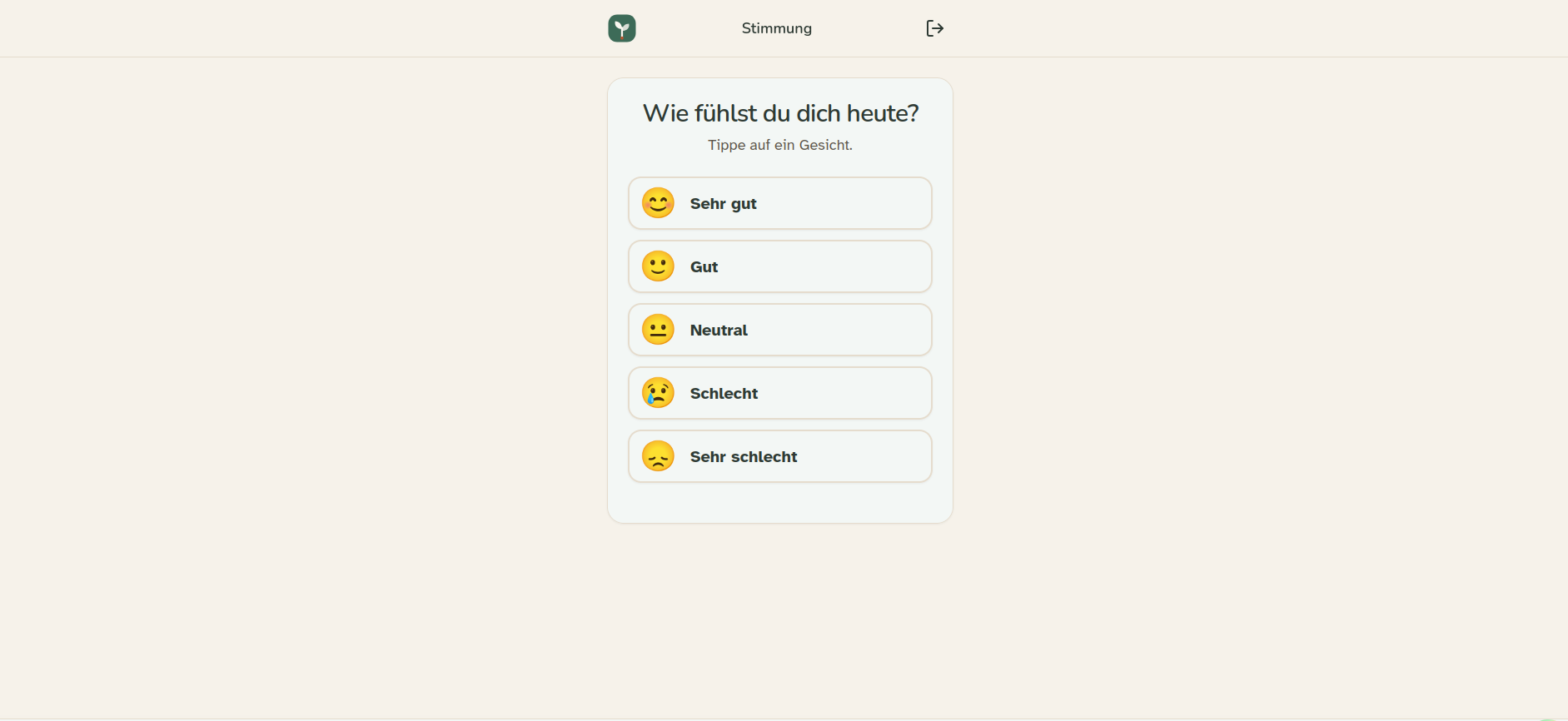
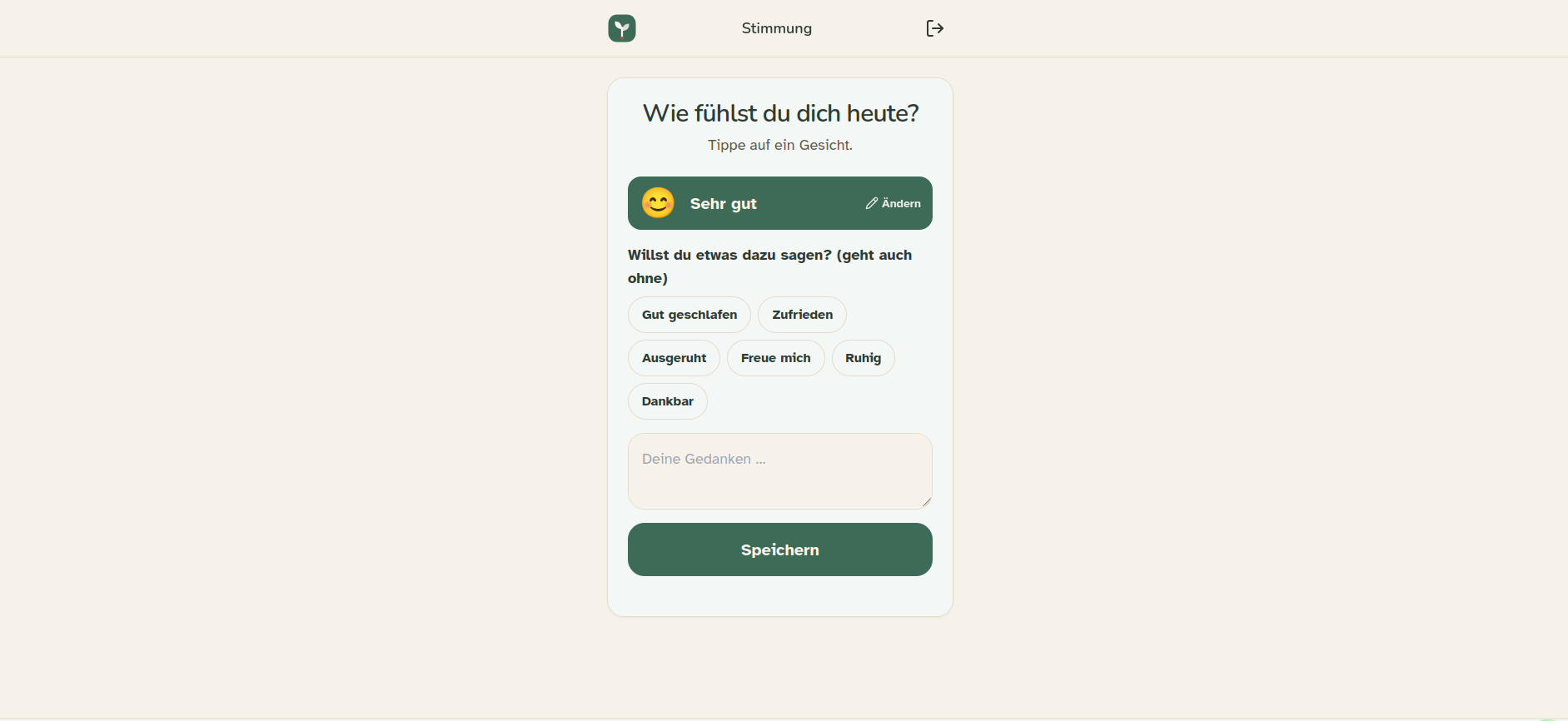
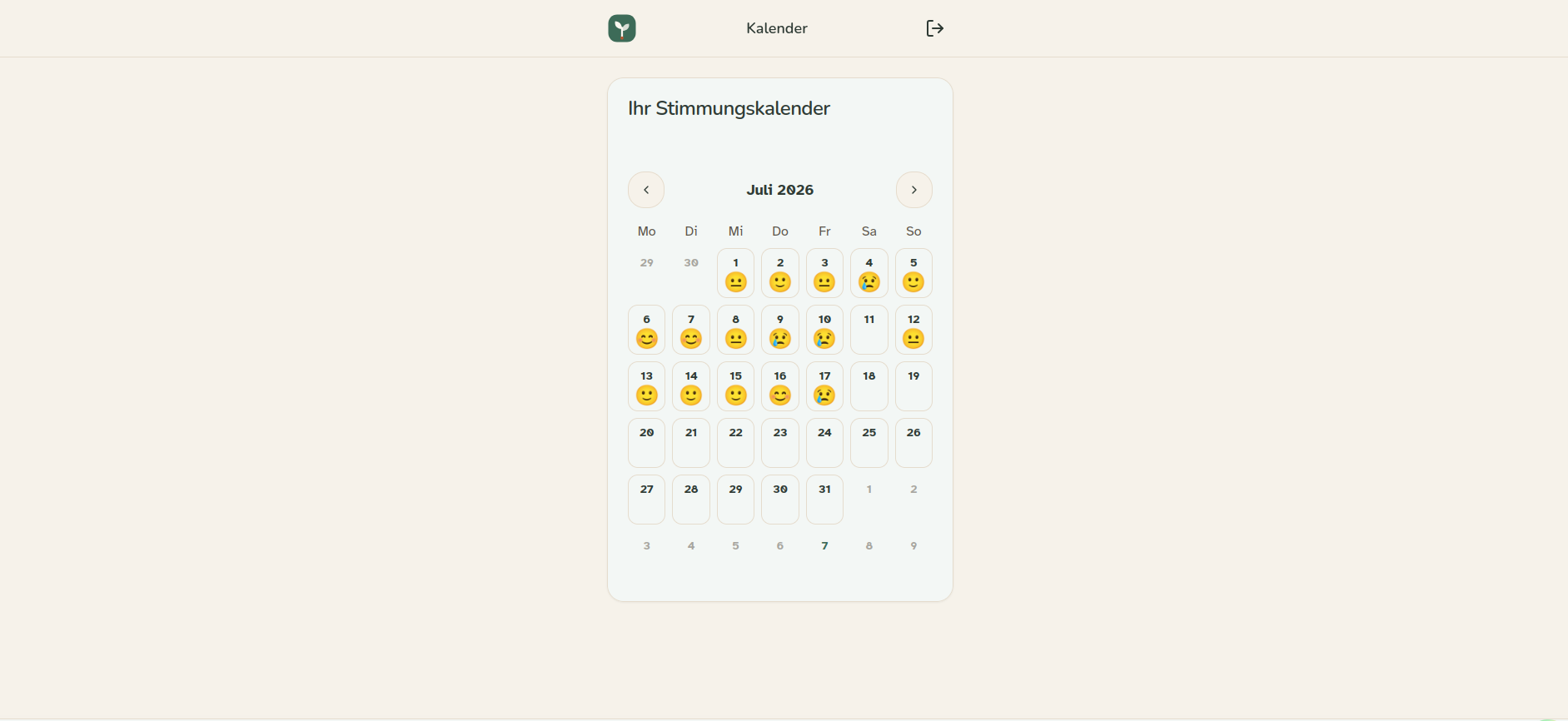
The calendar is deliberately available to the resident and not just to staff. Documentation that only flows upward is surveillance; the point of the product is that the person being documented can see their own record.
Staff view
Same data, opposite priorities: density, comparison, and trend over a cohort.
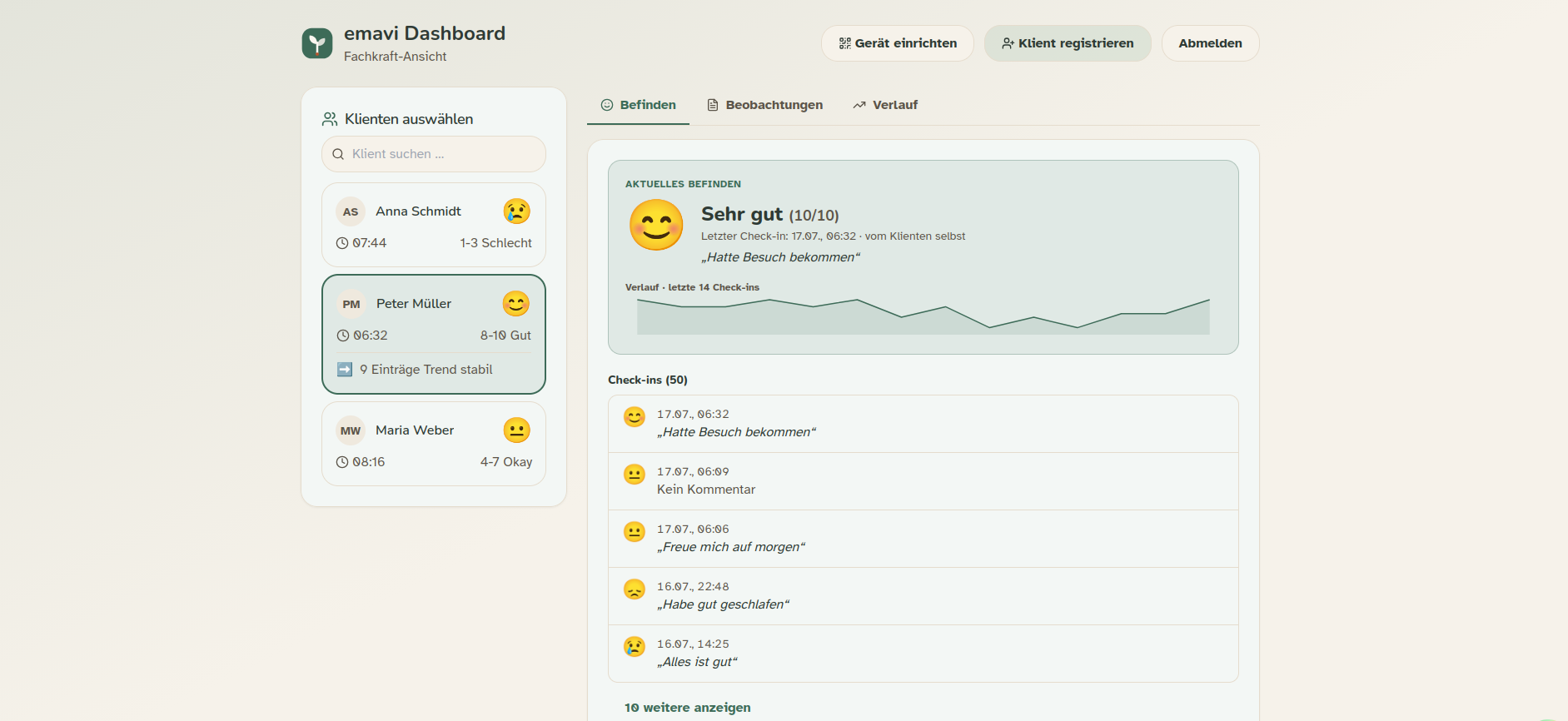
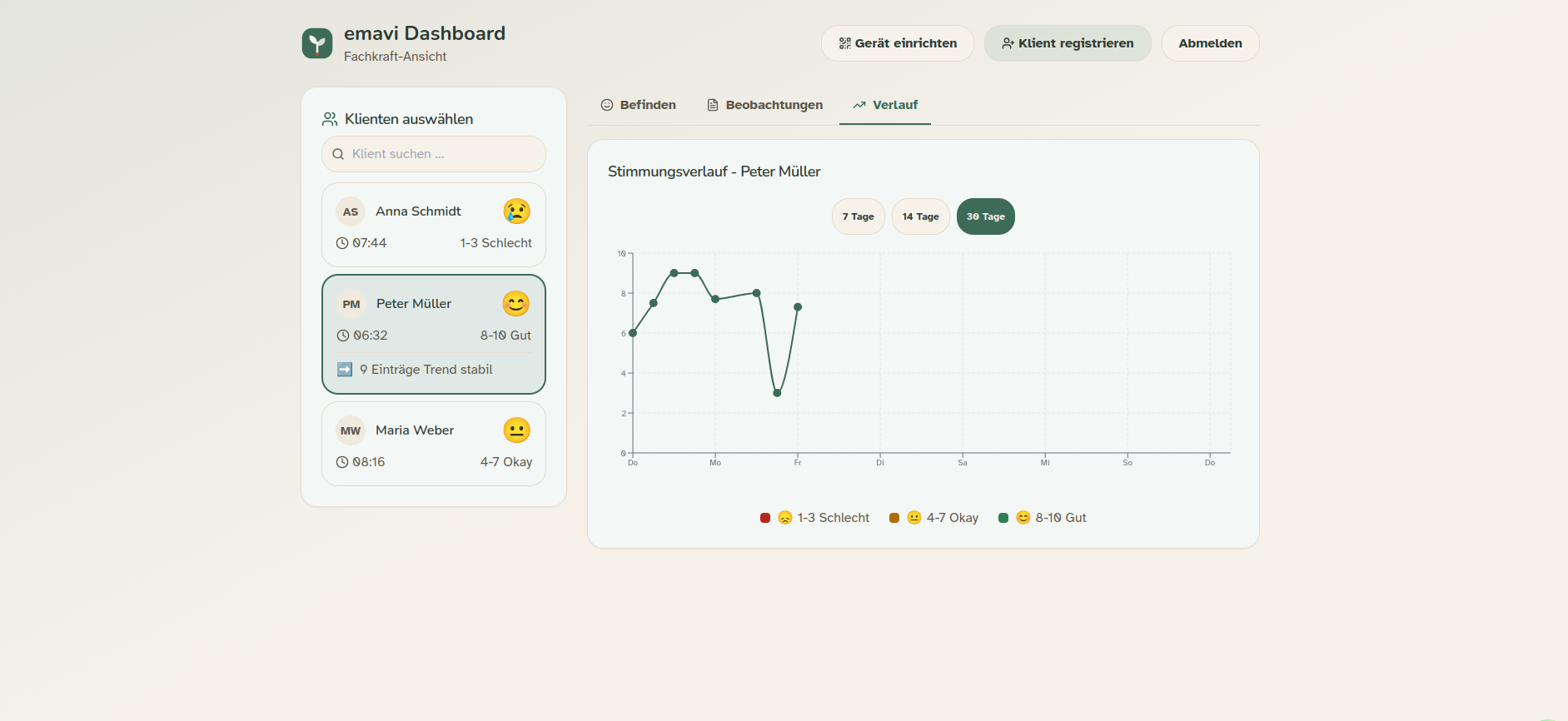
Screenshots use seeded demo data. No real resident information appears in this write-up.
Architecture & Technology Stack
Backend
- Framework: FastAPI (Python) - High-performance, asynchronous web framework
- Database: PostgreSQL with SQLAlchemy ORM
- Authentication: JWT-based multi-tenant authentication
- API Design: RESTful API with OpenAPI/Swagger documentation
- Migrations: Alembic for database versioning
Frontend
- Framework: Next.js 14 (React) with TypeScript
- Styling: Tailwind CSS for modern, responsive design
- PWA: Progressive Web App with offline support
- UI Components: Custom component library with shadcn/ui
- State Management: React Context API for tenant isolation
DevOps & Infrastructure
- Containerization: Docker & Docker Compose
- Reverse Proxy: Nginx for load balancing and SSL termination
- Multi-Tenant Architecture: Complete data isolation per tenant
- Environment Management: Separate development and production environments
Security-First Approach (DevSecOps)
Authentication & Authorization
# Multi-tenant JWT-based authentication
- Role-based access control (Admin, Staff, Resident)
- Tenant isolation at database level
- Secure password hashing with bcrypt
- Token-based session management
API Security
- Input Validation: Pydantic models for request/response validation
- CORS Configuration: Strict cross-origin policies
- SQL Injection Protection: ORM-based queries
- Rate Limiting: Protection against brute-force attacks
Data Security
- Encryption: Sensitive data encrypted in transit and at rest
- GDPR Compliance: Privacy-compliant implementation
- Audit Logging: Traceable change history
- Tenant Isolation: Strict data separation between tenants
DevOps Practices
Container Strategy & Multi-Service Architecture
Docker Compose Orchestration
The application uses a sophisticated multi-container setup with service dependencies and health checks:
services:
  db:
    image: postgres:18-alpine
    healthcheck:
      test: ["CMD-SHELL", "pg_isready -U ${POSTGRES_USER}"]
      interval: 10s
      timeout: 5s
      retries: 5
    volumes:
      - postgres_data:/var/lib/postgresql/data
    networks:
      - hepaassist-network

  backend:
    image: ghcr.io/pascalnehlsen/hepa-assist-backend:latest
    depends_on:
      db:
        condition: service_healthy
    ports:
      - "8001:8001"
    env_file:
      - .env

  frontend:
    image: ghcr.io/pascalnehlsen/hepa-assist-frontend:latest
    depends_on:
      - backend
    ports:
      - "3001:3001"

  pgadmin:
    image: dpage/pgadmin4:9.10.0
    depends_on:
      - db
    ports:
      - "5050:80"
Container Architecture Features
- Service Dependencies: Orchestrated startup order with health check conditions
- Persistent Volumes: Data persistence for PostgreSQL and PgAdmin
- Network Isolation: Custom bridge network for inter-service communication
- Restart Policies:
unless-stoppedfor automatic recovery - Port Mapping: Non-conflicting port allocation for local development
- Alpine Images: Minimal base images for reduced attack surface
CI/CD Pipeline with GitHub Actions
Automated Deployment Workflow
Fully automated deployment pipeline from push to production:
name: Deploy HepaAssist to VM

on:
  push:
    branches: [main]
  workflow_dispatch:

jobs:
  deploy:
    runs-on: ubuntu-latest
    steps:
      - Checkout repository
      - Set up Docker Buildx
      - Login to GitHub Container Registry
      - Build and push backend image
      - Build and push frontend image
      - Deploy via SSH to production VM
Pipeline Capabilities
1. Container Registry Integration
# GitHub Container Registry (GHCR)
Registry: ghcr.io
Image Naming: pascalnehlsen/hepa-assist-{backend|frontend}
Tags: latest, branch-name, commit-sha
2. Multi-Stage Builds
- Docker BuildKit enabled for advanced caching
- Layer caching with GitHub Actions cache
- Separate build contexts for backend and frontend
- Optimized build times with
cache-fromandcache-to
3. Secret Management
# Environment variables injected from GitHub Secrets
- DATABASE_URL
- JWT_SECRET_KEY
- OPENAI_API_KEY
- SSH_PRIVATE_KEY for deployment
- Registry credentials (GHCR_PAT)
4. Automated Deployment Steps
- Build Docker images with commit SHA tags
- Push to container registry
- SCP configuration files to production server
- SSH into VM and execute deployment commands
- Pull latest images
- Perform zero-downtime rolling update
- Clean up unused images
5. Deployment Security
- SSH key-based authentication
- Encrypted secrets in GitHub Actions
- No hardcoded credentials in repository
- Secure environment variable injection
Infrastructure as Code
Production Deployment
# Automated deployment via SSH
cd /opt/hepaassist
docker compose pull
docker compose up -d --remove-orphans
docker image prune -f
Environment Configuration
- Development: Local Docker Compose with hot reload
- Production: VM-based deployment with Caddy reverse proxy
- Secret Management: Environment-specific .env files
- SSL/TLS: Automated certificate management
Container Benefits Demonstrated
Development Experience
- Consistent environments across team members
- One-command setup:
docker-compose up - Isolated dependencies
- Hot reload for rapid iteration
Production Reliability
- Immutable deployments
- Easy rollback to previous versions
- Health checks for automatic recovery
- Zero-downtime deployments
Scalability
- Horizontal scaling ready
- Load balancing preparation
- Database connection pooling
- Service mesh compatible
Logging & Monitoring
# Structured logging for production readiness
- Application logs in /backend/logs
- Docker container logs via docker logs
- Centralized logging preparation
- Error tracking and debugging
- Performance monitoring prepared
Full-Stack Development Highlights
Backend Features
1. Multi-Tenant Architecture
# Tenant-isolated database access
class TenantMixin:
    tenant_id = Column(Integer, ForeignKey('tenant.id'))
    # Automatic tenant filtering in all queries
2. RESTful API Endpoints
/api/v1/auth- Authentication & session management/api/v1/admin- Administrative functions/api/v1/dashboard- Resident dashboards/api/v1/observations- Care documentation/api/v1/mood- Mood tracking/api/v1/export- PDF export functionality
3. Database Models
Models:
  - User (Multi-role support)
  - Tenant (Tenant management)
  - Observation (Care documentation)
  - Mood (Mood tracking)
  - ObservationBlockTemplate (Configurable templates)
Frontend Features
1. Progressive Web App (PWA)
// Offline-capable application with service worker
- Native app experience on mobile devices
- Push notifications
- Installable on iOS, Android, Windows
2. Responsive Multi-Device Support
Optimized for:
  - Smartphones (care staff on the go)
  - Tablets (resident interaction)
  - Desktop (administration)
3. User Interfaces
- Admin Dashboard: Tenant and user management
- Staff Dashboard: Resident documentation and care planning
- Resident Interface: QR code-based login for residents
- Setup Flows: Onboarding for new facilities
4. Component Library
// Reusable UI components
- Button, Card, Input, Label, Modal
- BrandLogo, DeviceSetupScanner
- ObservationList, QR Code Generator
Code Quality & Best Practices
Backend
- Type Hints: Complete Python type annotations
- Async/Await: Asynchronous database operations for performance
- Dependency Injection: FastAPI DI system for testable code
- Pydantic Models: Strict data validation
Frontend
- TypeScript: Type safety throughout the frontend
- Component-Driven: Modular, reusable components
- Tailwind CSS: Consistent design system
- Server Components: Next.js 14 App Router with RSC
Documentation
Docs:
  - API documentation (OpenAPI/Swagger)
  - Flowcharts for user journeys
  - Setup guides (German/English)
  - README files in all modules
Development Workflow
Database Management
# Alembic migrations
alembic revision --autogenerate -m "Description"
alembic upgrade head
Local Development
# Docker-based development environment
docker-compose up --build
# Hot reload for backend and frontend
Testing
# Test suite prepared
tests/
  - test_multitenant_auth.py
  - test_tenant_setup.py
Project Metrics
Technical Complexity
- Backend: 15+ API endpoints
- Frontend: 10+ routes with different user roles
- Data Models: 7+ SQLAlchemy models
- Services: 4 Docker containers in production
Features
- Multi-tenant architecture
- Role-based authentication
- PWA with offline support
- QR code-based login
- PDF export functionality
- Responsive design
- GDPR compliant
- Docker containerization
Demonstrated Skills
DevSecOps
- Container Orchestration: Docker Compose with multi-service dependencies and health checks
- CI/CD Pipelines: GitHub Actions with automated build, test, and deployment
- Container Registry: GitHub Container Registry (GHCR) management and versioning
- Secret Management: Secure credential handling with GitHub Secrets
- Infrastructure as Code: Declarative container configuration with docker-compose.yml
- Security-by-Design: JWT, RBAC, encryption at multiple layers
- Automated Deployments: SSH-based deployment automation to production VM
- Image Optimization: Multi-stage builds with layer caching strategies
- Database Migrations: Version-controlled schema management with Alembic
- Zero-Downtime Deployments: Rolling updates with service dependencies
Backend Development
- Python/FastAPI: Async web framework with automatic OpenAPI documentation
- RESTful API Design: Versioned endpoints with proper HTTP semantics
- PostgreSQL & ORM: SQLAlchemy with multi-tenant data isolation
- Async/Await Patterns: Non-blocking database operations for performance
- Multi-Tenant Architecture: Tenant-aware queries and data separation
- Authentication & Authorization: JWT-based security with role management
- Containerization: Optimized Dockerfiles with production-ready configurations
Frontend Development
- React/Next.js 14: Server-side rendering with App Router
- TypeScript: Complete type safety across the application
- Progressive Web Apps: Offline-first architecture with service workers
- Responsive Design: Mobile-first approach with Tailwind CSS
- State Management: React Context API for tenant isolation
- Component Libraries: Reusable UI components with shadcn/ui
- Build Optimization: Docker multi-stage builds for minimal image size
Software Engineering
- Clean Code: Consistent coding standards and best practices
- Design Patterns: Dependency injection, repository pattern, mixins
- API Design: RESTful principles with versioning and documentation
- Version Control: Git workflow with feature branches and protected main
- Documentation: Comprehensive API docs, flowcharts, and setup guides
- Testing Infrastructure: Test suite setup with multi-tenant test cases
- Environment Management: Separation of dev, staging, and production configs
Future Development Potential
Planned DevOps Extensions
- Automated testing integration (unit, integration, E2E) in CI/CD
- Kubernetes deployment for advanced orchestration
- Prometheus & Grafana monitoring stack
- ELK stack for centralized logging
- Automated security scans (Snyk, Trivy)
- Blue-green deployment strategy
- Auto-scaling based on load metrics
Planned Features
- Care documentation
- Real-time notifications
- Advanced analytics dashboard
- Multi-language support
- Mobile native apps
Summary
HepaAssist demonstrates a modern, security-oriented approach to developing scalable applications. The project combines DevSecOps best practices with full-stack development and provides practical solutions for real business requirements in the regulated healthcare sector.
Core Strengths:
- Production-ready multi-tenant architecture that ran in production
- Automated CI/CD pipeline with GitHub Actions
- Container-based infrastructure with Docker Compose orchestration
- Security at all levels with encrypted secrets and JWT authentication
- GitHub Container Registry integration for image management
- Modern technology stack with TypeScript and FastAPI
- User-centric frontend design with PWA capabilities
- GDPR-compliant implementation for healthcare sector